Project Activity Log in Notion for a 5-Person Software Team
ResultEvery task, update, and owner for a 5-person software team logged in one place, so everyone knew what was done and what was next.
How I organized meetings, client communication, and project documents for a university software project using a shared Notion activity log.
- Notion
- Google Meet
- Google Docs
- Microsoft Word
Real experience. In 2024, I worked with a 5-person team at Western Mindanao State University to build a document tracking system for our College of Engineering, with the Dean's Office as our client. We used a shared Notion workspace to log every activity, task, and milestone, so everyone could see what was done, what was in progress, and what was next.
What I handled
- Set up and led our first official team meeting over Google Meet
- Wrote and submitted the formal letter requesting an interview with our client, the Dean's Office
- Conducted the initial client interview to gather requirements
- Submitted revisions to our company paper
- Prepared the project scheduling chapter and project documents, including the software overview, requirements, and project costing
How the log works
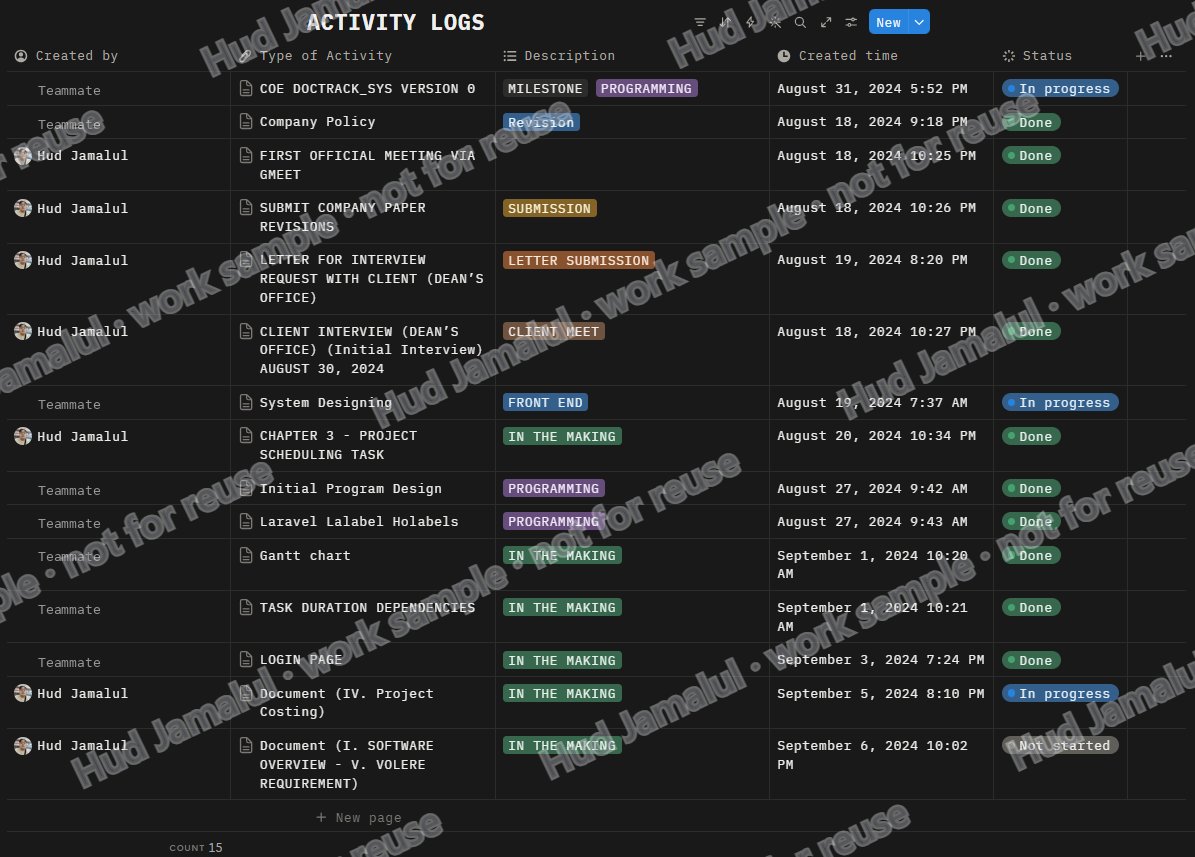
Each entry records who created it, the type of activity, a category tag (such as Milestone, Programming, Client Meet, or Submission), the date and time, and a status: Not started, In progress, or Done. This made it easy to track progress, spot what was falling behind, and keep the whole team accountable.
Why it matters for your business
I can set up and maintain the same kind of tracker for your projects, clients, or team tasks in Notion, Google Sheets, or any tool you use, and keep it updated every day.
The work
 Full size
1 of 1
Our team's Notion activity log: 15 entries tracked by type, category, date, and status