AI Receipt & Invoice Extractor for Bookkeeping Support
ResultRead 7 receipts and invoices in 3–4 seconds each and caught a duplicate and a math error
Drop receipt photos or PDF invoices into a Drive folder, and AI turns them into a clean bookkeeping sheet.
- Google Drive
- Google Sheets
- Google Apps Script
- Gemini AI
The task: Small businesses collect piles of receipts and invoices that need to be recorded for their accountant. This is part of the bookkeeping support I offer clients.
What I built:
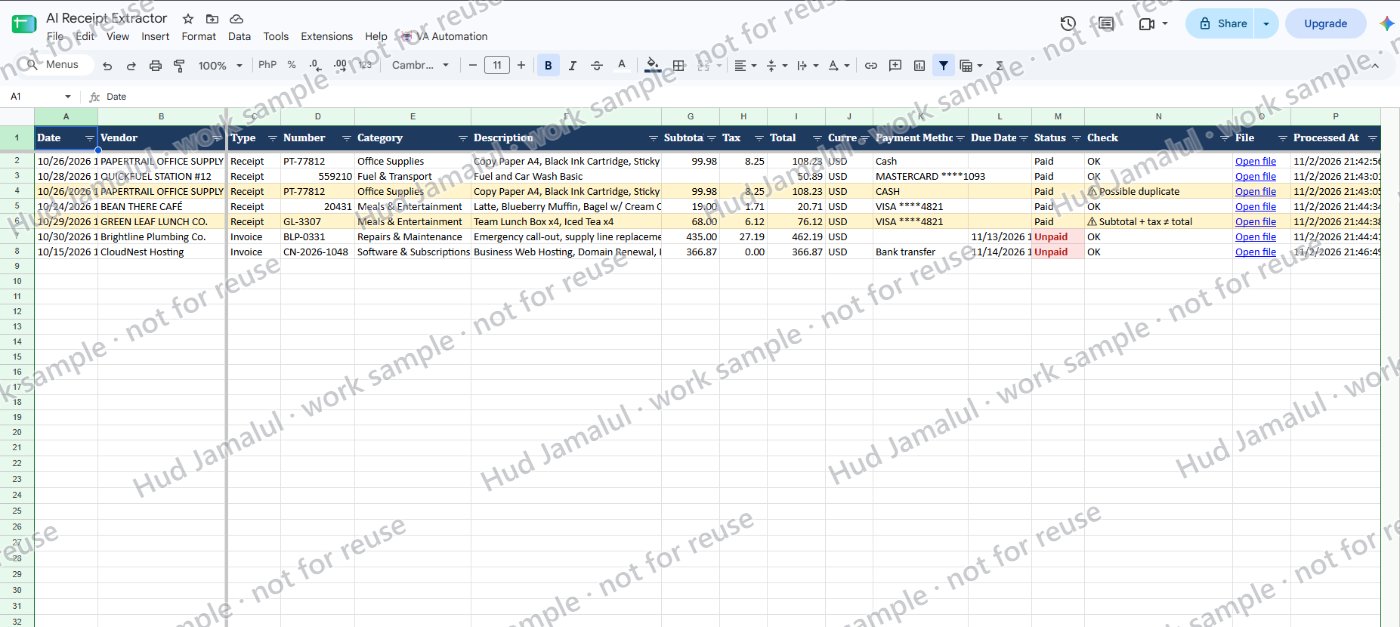
- AI reads receipt photos and PDF invoices: date, vendor, number, category, items, subtotal, tax, total, payment method and due date
- One row per document in an Expenses sheet, marked Paid or Unpaid
- Each file is renamed (date, vendor, total) and moved to a Processed folder, with a link in its row
- Automatic checks: totals that don't add up, possible duplicates and hard-to-read documents are flagged
- A summary of spending by category and the total of unpaid invoices
- Works in small rounds that continue by themselves, so large batches never time out
The result: In testing, 7 documents were read in 3–4 seconds each, with a duplicate receipt and a receipt whose totals didn't add up both flagged correctly.
Built with Google Apps Script. If a client prefers n8n, Zapier or Make, I can build the same workflow on their paid plan.
The work
 Full size
1 of 2
2 of 2
Demo: I drop receipt photos and PDF invoices into a Drive folder and click "Process new receipts". AI fills the Expenses sheet, flags a duplicate and a math error, marks unpaid invoices, and renames each file.