AI Inbox Sorter with Reply Drafts
ResultLabels every email automatically and is cleaning up my own 9,800-email inbox in the background
AI reads each email, sorts it into the right label, flags urgent ones and drafts replies for review.
- Gmail
- Google Sheets
- Google Apps Script
- Gemini AI
The task: A busy inbox hides urgent emails and new inquiries. I built this for my own inbox and for clients who need a clean, organized inbox every day.
What I built:
- AI sorts each email into business categories (Urgent, New Inquiry, Appointment, Invoice & Payment, Client Document, Vendor, Newsletter) with a priority and a one-line summary
- Urgent emails and new inquiries are starred; newsletters and promos leave the inbox
- For emails that need an answer, AI writes a reply and saves it as a draft in the same thread. Nothing is sent without review
- Privacy first: bank, security and login emails are sorted by fixed rules and are never sent to the AI
- A background cleanup for thousands of old emails, with a safe preview (no changes) and a one-click undo
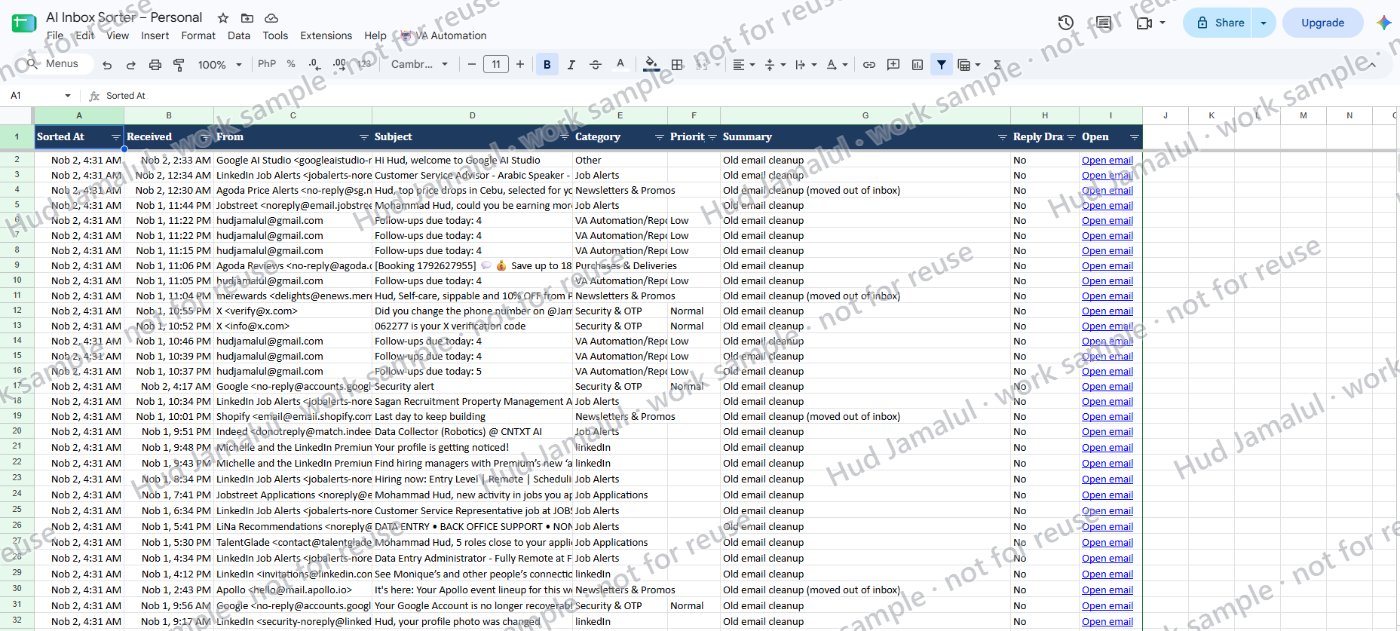
- Every email is logged in Google Sheets with a link to open it
The result: My own inbox of about 9,800 emails is being labeled automatically, and only recent and important emails stay in the inbox.
Built with Google Apps Script. If a client prefers n8n, Zapier or Make, I can build the same workflow on their paid plan.
The work
 Full size
1 of 2
2 of 2
Demo: AI reads a business inbox, labels each email (Urgent, New Inquiry, Appointment, Invoice and more), stars urgent ones, and saves reply drafts inside the email threads. Every email is logged with a one-line summary.